, , , , , ,
search relation.
, , , , , , , , , , , , , , , , , , , , , , , , , , , , , , , , , , , , , , , , , , , , , , , , , , , , , , , , , , , , , , , , , , , , , , , , , , , , ,
The Latest Technology News
, , , , , ,
search relation.
, , , , , , , , , , , , , , , , , , , , , , , , , , , , , , , , , , , , , , , , , , , , , , , , , , , , , , , , , , , , , , , , , , , , , , , , , , , , ,


It’s kinda hard to believe that we’ll be playing Guilty Gear Strive in just over a week from now, but apparently the fighting game will continue to receive new content outside of characters long after the launch period.
Arc System Works revealed in a recent interview they were forced to cut a number of features and modes from Strive’s release due to the COVID-19 pandemic’s strained work restrictions. The developers do plan, however to include all of them in future updates at some point while naming some interesting examples of what could be coming.
The interview comes by way of Angelo Dargenio via Rooflemonger, who learned that around 70 percent of ArcSys’ developers had to shift to a work-from-home environment, which of course made their jobs more difficult.
“While this unfortunately meant that we had to cut quite a few elements and modes from the game, we intend to add them all in updates after the game’s release, so expect new content coming in the future,” wrote an ArcSys representative.
Interestingly, they also state that all versions of Guilty Gear Strive between the PlayStation 4, PlayStation 5 and PC will all contain the same features and content when asked on the subject and seems to fly in the face of what we had heard previously.
Last fall, the PlayStation Store listing for Strive mentioned a multiplayer battle mode exclusive to the PS5 that many presumed to be either tag team versus or something like Dramatic Battle in other series like Street Fighter.
That part of the listing is no longer on Strive’s pre-order page, so it seems that ended up on the cutting room floor as well.
While that may be a bit disappointing to hear right now, the ArcSys rep does also state specifically they’d like to add a unique mode that can take advantage of the power of the PS5, which is likely referencing whatever was planned before.
Outside of playable modes, more accessibility options are also being planned or looked at for the game including lighting / UI effects targeted at those who have trouble with colors as well as a comprehensive voice system to benefit visually-impaired players.
Hopefully, ArcSys does get the opportunity to make these and more features a reality in the future, but we should still have plenty to do at launch between Story, Missions, Training, Arcade, Survival and online.
You can check out the full content of the interview below thanks to Angelo Dargenio and Rooflemonger, which covers more topics like what they focused on tuning the game’s balance and options for all skill levels plus more.
Not able to get away this weekend? Don’t worry, you don’t have to go anywhere to take advantage an amazing deal or three. You see, Memorial Day weekend is a great time to find sales on all kinds of products, especially if you skip the stores and shop online — you can be scoring major discounts while relaxing on your couch.
Traditionally, the holiday is known for its sales and deals on major appliances, patio furniture and mattresses. But those aren’t the only categories you should be looking at for huge discounts on a product’s original price — below you’ll find some Memorial Day sales and select items that caught our eye, including $400 off a 65-inch Vizio OLED TV, $150 off the Neato D7 robotic vacuum ($150 off), free meat and free access to Ancestry.com.
These deals can be found at online retailers such as Lowe’s and Best Buy as well as individual merchants like ButcherBox, GlassesUSA and Samsung. Highlighted deals that require a promo code include that code below. Keep reading for our picks of the best Memorial Day deals you can find right now. This post will be updated with additional sales and deals soon.
Sarah Tew/CNET
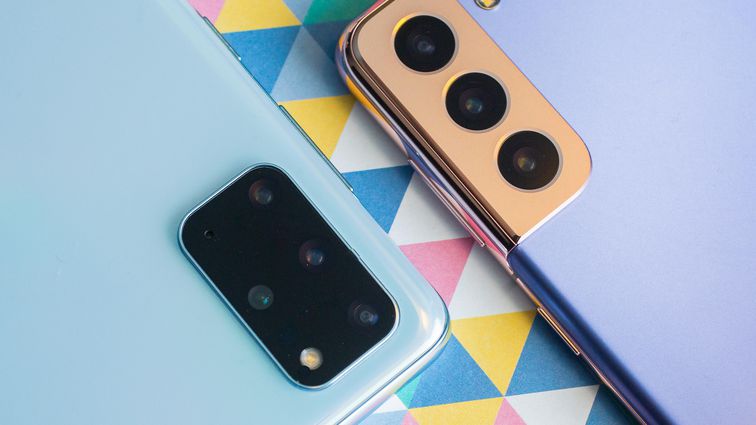
From large appliances to video games, Best Buy is slashing prices throughout the store for its Memorial Day sale. You can save up to 10% on LG appliances and up to $300 on an LG OLED TV. Been pining for an Apple wearable? You can save $70 on the Apple Watch Series 6 and $40 on AirPods. Samsung’s Galaxy S21 5G phone is $350 off, while iPhone 11 models are $275 off. And if you need new games for your console, dozens of titles for Xbox, PlayStation and Switch are discounted, including many that are half price.

Vizio
Contrast ratio is arguably the most important aspect of picture quality, and OLED TVs produce the best contrast ratio with absolute blacks and extremely bright whites. TVs with newer OLED technology, not surprisingly, cost quite a bit more than older LCD TVs. Vizio’s OLED line has some of the most affordable OLED TVs, however, and that’s never been more true than for the 65-inch model that’s $400 off at Best Buy.
Brian Bennett/CNET
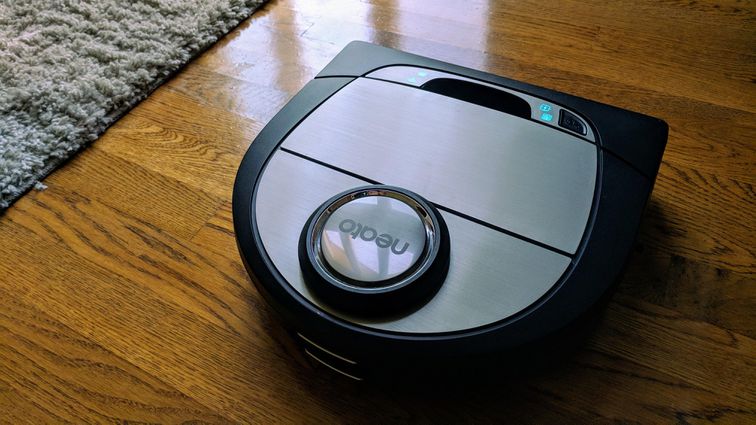
‘Tis the season for tracking dirt and sand (say, if you’ve been at the beach all weekend) into your house. Why not get some robotic help with keeping your floors clean? The Neato D7 is a lidar-guided robot vacuum cleaner that’s one of the best robot vacuums CNET has reviewed. In his write-up, Brian Bennett declared it the “best midrange robot vacuum.” And head-to-head against the iRobot Roomba S9 Plus, the D7 was called “the best all-around value.” Usually priced at or around $600, the Neato D7 is discounted to $450 at Lowe’s this weekend (the product page says the sale ends today, but it’ll last through June 5, according to Lowe’s).

Hydroflask
The Hydro Flask is our favorite reusable water bottle for its double-wall vacuum insulation design, durable stainless-steel materials and cool color options. A Hydro Flask bottle can keep a cold drink cool for up to 24 hours and makes a perfect beach companion. For the winter months, it will keep hot beverages warm for up to 12 hours. You can save 25% sitewide with free shipping with code WELOVESUMMER. The popular 32-ounce Wide Mouth bottle, for example, is on sale for $34, down from $45.

Screenshot by Matt Elliott/CNET
Summer is not only beach season: It’s also barbecue season. With ButcherBox, you can kick your summer grilling up a notch. It’s one of our favorite meat subscription services and features 100% grass-fed beef, humanely raised pork and free-range organic chicken. For Memorial Day, new subscribers will get a free BBQ bundle with their first order that includes two New York strip steaks, six burgers and 5 pounds of drumsticks.

Fold3
To celebrate Memorial Day, Ancestry.com is opening its vaults and letting you search your family’s military history for free this weekend on its Fold3.com site.

GlassesUSA is one of our favorite sites for buying prescription eyeglasses online. It has more affordable options for buying prescription eyeglasses online than a site like Warby Parker, and also offers premium designer frames from the likes of Oakley and Ray-Ban. For Memorial Day, you can get 60% off frames with basic lenses with code DEAL60 or 30% off your entire order with code USA30. You can also save 20% off Oakley and Ray-Ban with basic prescription lenses with code OKRAY20.

MYX Fitness
MyxFitness is a Peloton alternative service that includes a bike with a huge 21.5-inch display along with a mat, foam roller, resistance band and six-piece weight set for $1,499. And you can knock $300 off the price with code MEMORIAL300, which also includes free shipping and assembly (a $250 value, according to Myx’s math).

Rumpl
My kids each got a Rumpl blanket for Christmas last year, and they take them everywhere. In the car. On the couch. Off to bed. And they were invaluable each weekend when we went skiing and our car was the closest thing we had to a lodge. Rumpl blankets are light and incredibly warm, and come in a variety of cool colors and patterns. And they’re 25% off right now.

Brian Bennett/CNET
Have you experienced a sense of envy when hanging out in your friend’s backyard around their Solo Stove? Now is your chance to get one for your own patio for gatherings around a smokeless fire pit. Solo Stove makes one of our favorite firepits, and all of the company’s firepits are 25% off and come with a free stand for Memorial Day.

Samsung
You can save 30% on a refrigerator, washer or dryer and 25% on a range. And you can save $700 if you buy a four-piece kitchen package.
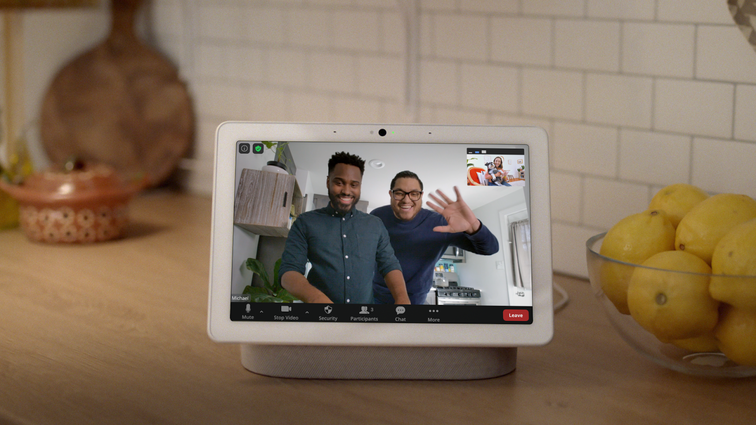
You can knock $50 off the price of the Google Nest Hub Max at Adorama’s Memorial Day sale with code EXTRA50OFF. With a 10-inch display, the Nest Hub Max offers a bigger screen and better sound quality than Google’s standard smart display. It also includes a facial recognition camera, which you may or may not want. You can disable the camera when it’s not in use, and it has some pretty cool tricks like following you around the frame when you’re making a Google Duo video call and letting you pause or resume videos and music simply by raising your hand.

Stasher
Unless you plan to invite the neighborhood over for a cookout, you’ll need a way to store some of the above BBQ bundle. Stasher provides a sustainable and stress-free way to do just that and is offering 25% off its entire site. It makes reusable storage bags to decrease single-use plastics. Stasher’s storage bags are made of silicone and feature pinchable seals, saving you from ever having to search for a matching lid again.
The following video summarizes this article:
New updates are being added at the bottom of this story…
Original story (published on January 29, 2021) follows:
There appears to be a recent server-side update on Google Chrome browser for Android following which the tab-view has been completely altered for many.
Previously, tabs used to appear in a vertical cascading list of cards that spanned the entire length of the screen. This view only allowed previewing one site at a time.
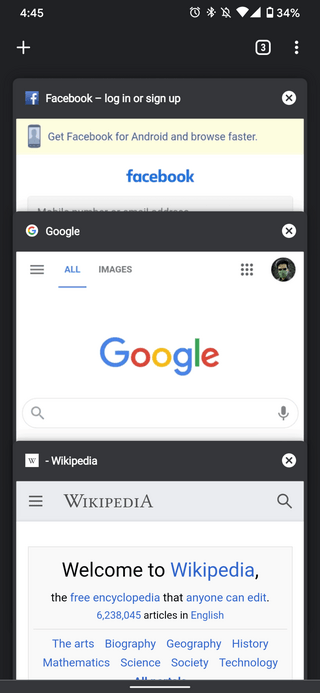
Chrome’s old vertical tab layout
But after the update, tabs now appear in a grid layout allowing several opened sites to be previewed at once without getting obscured.
This change also opens up an avenue for Tab Groups support – something that wasn’t possible earlier. Tab Groups facilitate smoother work-flow as tabs can now be organized into neat little assortments.
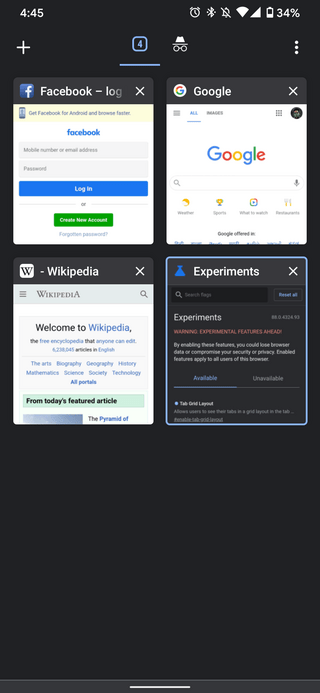
Chrome’s new grid layout for tabs
This is especially useful for power users that keep dozens of tabs open at once. With the change, it will be much easier to find them if there is a large number open at once.
However, there are a couple of downsides to the update too. One-handed usage has become a tad more difficult as tabs are now placed at the top of the screen rather than being aligned to the center. Also, there are many that simply do not like how the grid layout looks.
And while it’s debatable if the changes are for the better or worse, it’s quite clear that most have already made up their minds.
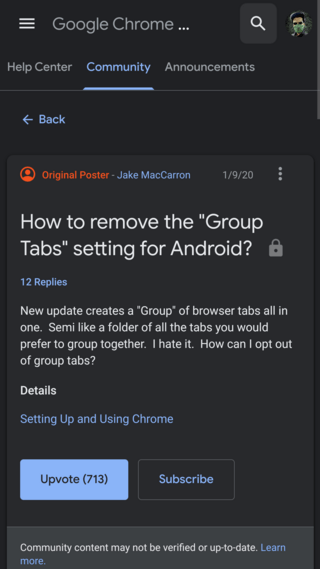
There have been plenty of complaints from angry users asking for the update to be rolled back. Many are also asking for a way to disable the tab groups and grid layout on Chrome.
This is an annoying feature. And it doesn’t even ask if user want to enable it. Chrome devs become worse day by day. It causes many problem for my company when using our web apps with chrome, such as showing update popup randomly, breaks old features, and now this.
Source
If you are one of such users, then there indeed is a way to change the tab view in Chrome for Android back to its previous state. And it involves Chrome Flags.
Chrome Flags are experimental features that aren’t yet enabled by default but can be with just a few clicks. They’re simple to use and can transform your browsing experience.
Similarly, there is a switch for the new tab grid-view as well under the list of available flags. To access it, you need to enter chrome://flags into the Chrome address bar.
You will then be directed to the flags page. Next, enter the words “tab grid” in the search bar following which you should see the desired flag show up just like in the below image.
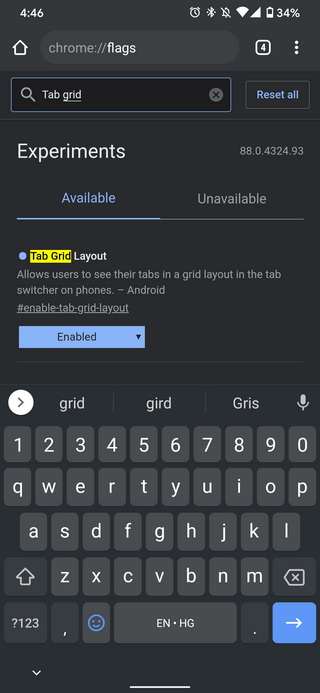
Simply select it and change its value from ‘Default’ to ‘Disabled’. After this, restart Chrome a couple of times to see the grid layout revert to the good old vertical card view once again.
Furthermore, if you also want to disable tab groups on Chrome, just to be sure, then the #enable-tab-groups flag should help you with that.
12:27 pm (IST): As per a Product Expert on the Google forums, it now seems that the option to disable group tabs via Chrome Flags has stopped working.
Seems like this flag was removed and this new feature is now by default, without an option to disable it.
Source
While we were unable to verify this, it could be possible that it actually is a server-side change and has been put into effect for select users only. If true, it’s highly disappointing.
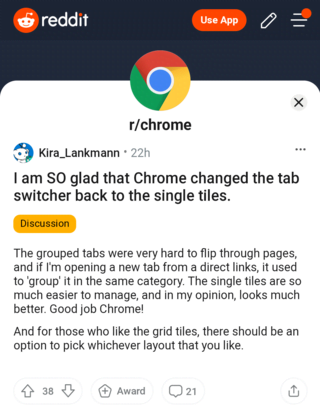
11:12 am (IST): As per several Redditors, the grid layout/tab groups UI appears to now have been rolled back on Chrome. A great relief indeed, but there is still no telling if Google might bring it back.
After all, it could be quite possible that the rollback was initiated due to unmentioned bugs. Anyway, for now, it is advisable to find any Chrome flags that include the word ‘group’ and disable them.
11:12 am (IST): Contrary to recent reports that Google had rolled back the grid for Tab Groups layout, 9to5Google says the feature is actually rolling out widely.
03:44 pm (IST): As for those uninterested in the new feature, there is room to disable it via the Chrome flags settings, again, contrary to recent reports that the flag had been completely removed from Chrome.
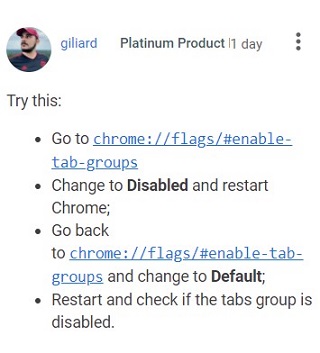
(Source)
12:51 pm (IST): We have tested the workaround to disable the grid view at our end and can confirm that it works. We are sharing the step-by-step screenshots below.
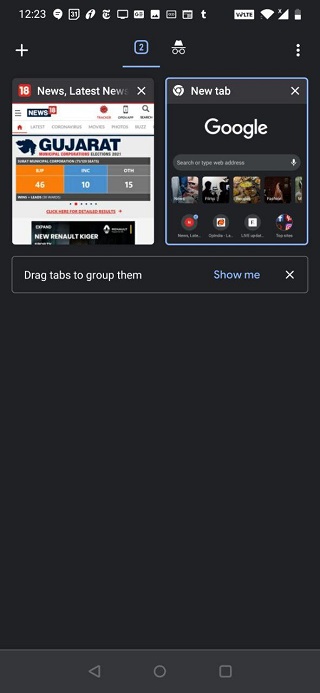
Default grid-view
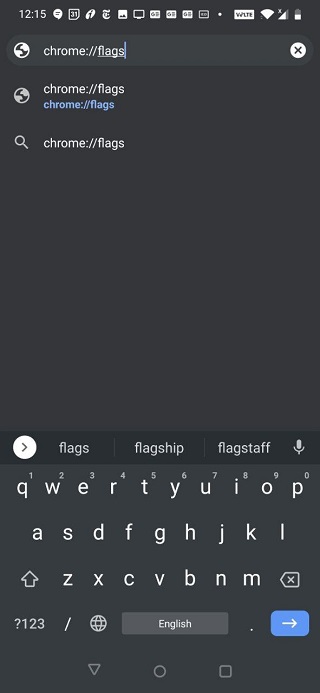
In Chrome address bar, type “Chrome://flags”
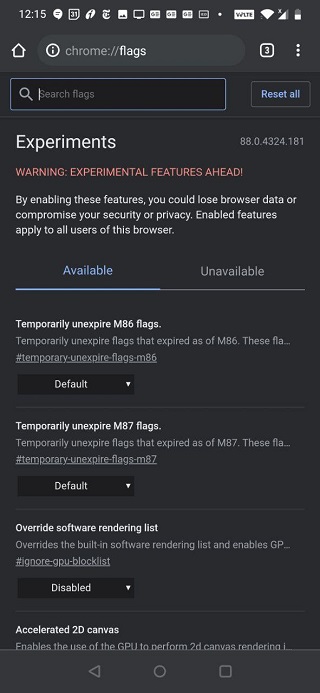
The ‘Experiments’ will show up
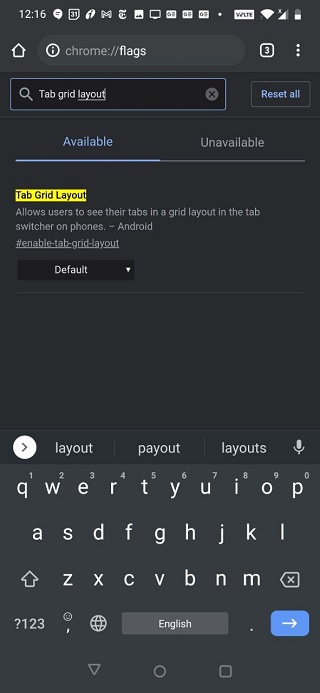
In the search box, type “Tab grid layout”
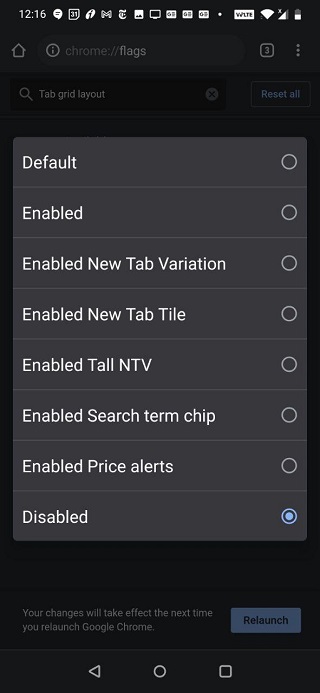
In the drop down menu, instead of ‘Default,’ select ‘Disabled’
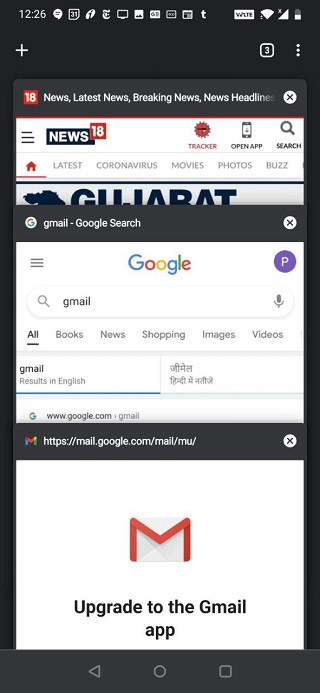
Relaunch Chrome a couple of times for the change to be implemented
For those of you who are interested in keeping the grid-view intact but wish to disable grouping, here’s a user-shared workaround for you.
In the Chrome address bar type “chrome://flags,” and you’ll be redirected to the Experiments page. Over there, in the search box, type “Tab.” Following the Tab Grid Layout, you’ll see three Tab group flags namely ‘Tab groups’, ‘Tab groups continuation,’ and ‘Tab groups UI improvements.’
Set all three of them to ‘Disabled,’ and then relaunch a couple of times for the grouping to be disabled while keeping the grid-view as it is.
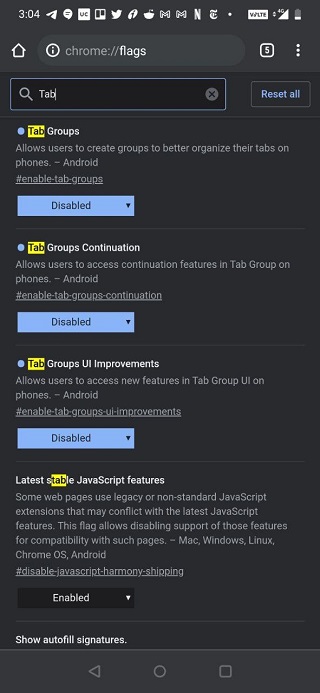
We’ve tested the workaround at our end and can ensure that it works.
We’ve come across user queries regarding naming/renaming tab groups on Android, just as can be done on Chrome’s desktop version. But going by the reports, the ability to rename and assign specific colours to tab groups is yet to be added to Android.
We’ve already highlighted a workaround (update 5 section) to keep the grid-view as it is but disable grouping.
Now we’ve caught hold of another user-shared workaround wherein you have to set ‘Tab Grid Layout’ to enabled, ‘Tab Group’ and ‘Tab Groups Continuation’ to disabled and ‘Tab Groups UI Improvements’ to default.
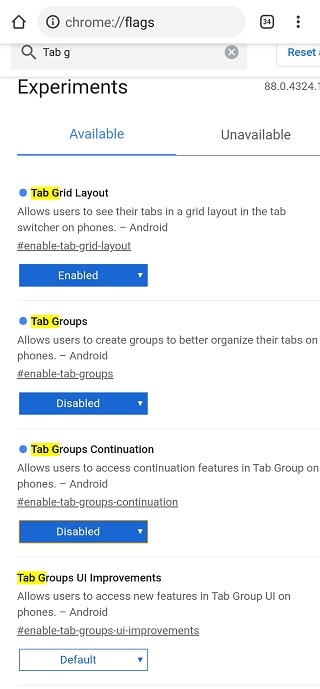
This will take away the ‘Group Tabs’ option that shows in the three-dot menu. We’ve tested the workaround at our end and can confirm it works.
Just in case you aren’t aware, sharing your feedback with the developers in case you don’t like a feature (while it’s still under the experiment phase) is very important. The reason being, the flags for a feature show up under the Experiments only when a feature is being tested, meaning, you still have the option the enable/disable it.
But once the feature makes way to the stable release, there is no way to revert the change, but get stuck with it forever. This information was recently shared by one of the product experts at the Google Chrome community while addressing users’ queries on how to disable the Reading list feature that was added with Chrome version 89 recently.
So sharing feedback in case of the Tab Groups/Grid view feature in question in this post also becomes important. Else, once the feature makes way to the stable release, you won’t have an option to revert the change. Take a look at how the expert explained the importance of timely give user feedback:
I would also like to recommend that if you don’t like the function, send your opinion to the Chrome team about what aspect you don’t like, or why you don’t like it:
Report a bug or feedback on Chrome – Google Chrome Help
It is very important that you do this, since these comments will be received directly by the Chrome team (they do not usually go through the forums in Spanish). Also, it is important because if this function is set to the stable version for everyone, the flag will eventually be removed, and there will be no way to disable the option.
In order to restore the cascading tabs in Chrome on your Android device, here’s another workaround (slightly different from the one mentioned in this article) shared by a product expert at the community:
Please test another possible solution. It’s about the flags again.
So: chrome: // flags and enter “grid layout” should appear:
1. Tab grid layout
2. Tab groups
3. Tab groups continuation
4. Tab switcher on return
5. GTSAnd so set it to Disabled for 1,2,3,4 and Enabled for 5. Restart Chrome (or preferably restart the phone).
Going by the information shared by one of the users, before the ‘Tab groups’ and ‘Tab grid layout’ flags are permanently disabled (with update version 90), one will be able to access them temporarily. Here’s how:
These flags are set to expire in Chrome 90. After that you can access them temporarily by setting chrome://flags/#temporary-unexpire-flags-m90 until they’re removed permanently.
What if Google Chrome was fully customizable and experimental features like Reading List and Tab Groups were all under user control even when they hit stable? Let us know your thoughts by voting on this poll.
In case you wish to disable tab grouping and bottom favicon bar, keeping the new tab grid layout intact, in the flags, set Tab Grid Layout to “Enabled.”
In the flag search box in Experiments, type “Enable conditional tabstrip,” and select “Disabled” in the drop-down menu. Relaunch chrome a couple of times for the change to be implemented.
Going by the latest user reports, Tab groups/tiled-view is back for some, despite disabling them in the flags. But at least according to some of the affected, the workarounds shared in update 9 section of this article resolved the issue for them.
So those of you facing the problem can give it a shot.
For those of you who are facing the issue wherein the disabled Tab groups/grid view is back again despite the flag showing it Disabled, here are a few user-shared workarounds you can try:
Set “Tab Groups” to Disabled.
chrome://flags/#enable-tab-groups
Then force stop the app and reopen.
Disable Grid layout AND tab groups, relaunch the browser then restart your device. Fixed it for me!
In chrome “Settings” “Accessibility”
“Simplified view for open tabs”
I went into flags, searched for anything tab grid related and disables them all (not sure if that helped) because nothing changed. Then I cleared cache and the “free space” storage. When I restarted chrome after that, bye bye dumb tabs!
Going by reports, the latest update (version 90) may be to blame for re-enabling the feature despite it disabled in the flags.
So all you need to do is enable chrome://flags/#temporary-unexpire-flags-m89 and chrome://flags/#temporary-unexpire-flags-m88. Here’s how a user has explained this:
Your Chrome probably got updated to v90, that’s why the flags aren’t working anymore.
You can enable them again by going to chrome://flags/#temporary-unexpire-flags-m89 and chrome://flags/#temporary-unexpire-flags-m88 and enable both of them.
Now your flags will work again. Just tested on a updated v90 Chrome
While another user suggests:
Chrome://flags
Set it up like this
Temporarily unexpire m88 flags: enabled
Tab grid layout: disabled
Tab groups: disabled
Tab groups continuation: disabled
Tab switcher on return: disabled
Enable tab-to-GTS animation : disabled
RESTART PHONE
Uninstalling the latest update is another alternative that you can try. But the problem here is it’ll take away the dark mode as well. Here’s how a user explains it:
My only option to get the original chrome tab view is to uninstall all updates, but then the old versions of chrome don’t allow you to use Chrome on dark mode, so even though you can still change it in the flags, the url bar and nav bar at the bottom are still white
Going by what a product expert has shared on the community if despite disabling Tab Grid Layout you still get the layout, it could be that the devs have considered the user feedback and removed the function, but the option is still there. That’s why you’re suggested to drop feedback.
I’m getting the same.
I guess they’ve removed the function, but not removed the option dialog yet
go to menu > Help & feedback > send feedback
For those of you facing the Tab groups re-enabled despite disabling after the recent update, reports suggest disabling – ‘Tab Groups,’ ‘Tab Group Continuation’ and ‘Tab Groups UI Improvements’ does the trick. So you can give it a shot.
A couple of users have shared a few more combinations of flags disabling which resolved the Tab Groups re-enabled issue for them. Here’s what they shared:
I found this, and it works.
Chrome://flags
Set it up like this
Temporarily unexpire m88 flags: enabled
Tab grid layout: disabled
Tab groups: disabled
Tab groups continuation: disabled
Tab switcher on return: disabled
Enable tab-to-GTS animation : disabled
RESTART PHONE
In a new tab:
chrome://flags/#enable-start-surface
#enable-tab-grid-layout
#enable-tab-groups
#enable-tab-groups-continuation
#enable-tab-groups-ui-improvementsMine didn’t revert until I had disabled all 5, but I also wasn’t taking the most scientific approach.
One of the affected users has shared that a simple tweak of switching between Default and Disabled, followed by a device reboot did the trick for them. So you can also give it a shot.
Today, Group Tabs reappeared. It was still disabled in the Group Tabs flag. I’ve switched between Default and Disabled and relaunched. I’ve restarted my phone. And I still have the Group Tabs.
On the other hand, a product manager at the Chrome community has mentioned this reappearance may have to do with the concerned flags taken down. Here’s what they said while responding to one of the affected users:
Flags are experimental and can be removed anytime without any notice. So, that experimental feature may no longer be available.
Another affected user has shared that keeping ‘Tab Grid Layout’ and ‘Tab Groups’ flags to Disabled and ‘Conditional Tab Strip’ to Enabled is what did the trick for them.
So those of you struggling with grouping or grid view re-enabled recently can give this flag combination a try.
Some users report that Tab Groups or Grid-view keep re-enabling on Google Chrome Android and we now have a dedicated article on what you can do to disable them. Head here for the same.
One of the users has shared another combination of flags that worked for them (make sure you relaunch Chrome a couple of times for the change to be implemented).
The combination that works for me:
Tab Grid Layout – Disabled
Tab Groups – Disabled
Tab Groups Continuation – Default
Tab Groups UI Improvements – Default
Tab switcher on return – Disabled
Enable Tab-to-GTS Animation – Enabled
Conditional Tab Strip – Enabled
Looking at the pattern of the Tab group/grid-view flags being overridden every time a new update is pushed, a product expert is now speculating that the feature is likely to make way to the stable build.
Meaning, there won’t be any way to disable it, unless Google decides to give an option to do so. Here’s what the product expert said:
Yes it looks like the feature is going to be rolled out.
My guess is, not enough people complained
In order to respect every selected flag option, what you can do is disable the concerned flags – i.e. Tab Groups, Tab Grid Layout, Tab strip, and Conditional Tab Strip – one by one, followed by relaunching the browser a couple of times (every time you disable a flag).
Here’s a user-shared video wherein they’ve suggested resetting all the flags to default before tweaking the respective ones to disable Grid view on Android.
If you have tried all the aforementioned ways but still couldn’t disable Chrome Tab Groups, you can give this hack a try.
We are sharing the user comment for your convininece:
Okay, I managed to fix it (probably temporarily) by disabling Start Surface too and resetting a few times. Try that?
A lot of fellow commentors on the Reddit thread confirmed this hack worked for them.
Here’s the complete workaround involving Start Surface that you can try:
go to chrome://flags
reset everything to default (optional, but I did it anyhow)
disable start surface, tab grid layout and tab groups
restart chrome a couple times (I think I had to do it 3-4 before it started working)
Google Chrome no longer supports disabling the Tab Group and Grid view features and has been enabled permanently, confirms a user who is testing Android 12 beta 1 update. Find more here.
And the saga continues. With the latest Chrome update, the ability to disable Tab Groups (or Grid-view) is once again gone for some.
After the latest Chrome update (91.0.4472.77), among the experimental flags, only ‘Tab Grid Layout’ and ‘Tab group Continuation’ are available (thanks for the tip Iñaki Nahuel Santos Angel) and they don’t help to disable the Tab Groups.
The flags that helped earlier – ‘Tab groups’, ‘Tab groups UI improvements’, ‘Tab switcher on return’, and ‘Enable tab-to-GTS animation’ have been taken away.
Apart from that, ‘Temporarily unexpire 89 flags’ and ‘Temporarily unexpired 90 flags’ are available, while ‘Temporarily unexpired 88 flags’ has been taken away. You may try disabling 89/90 to see if that helps.
Now that Google has completely taken away the option for users to disable Tab groups on Android, the only plausible way to get rid of the forced feature update is to revert back to a previous version of Chrome.
The quickest way to do so is to head to the Google Play Store, search for Google Chrome, tap on the search result, and tap Uninstall. Confirm your action by hitting Uninstall again.
This will revert Google Chrome back to the version that came pre-installed on your device. Do note that doing so will result in a loss of all data in case you didn’t have sync enabled via your Google Account.
Thanks for the tip, Aaron Redlitz!
One of our readers has shared an interesting workaround that does indeed help disable the Google Chrome tab groups feature on Android. You can follow the steps in the exact order to get rid of the tab groups.
1: Tab Grids Layout: Disabled
(Click Relaunch Prompt)
2: Tab Groups Continuation: Disabled
(Click Relaunch Prompt)
3: Temporarily unexpire M89 flags: Disabled
(Click Relaunch Prompt)
4: Temporarily unexpire M90 flags: Disabled
(Click Relaunch Prompt)
5: Tab Groups: Disabled
(Click Relaunch Prompt)
6: Tab Groups UI Improvements: Disabled
(Click Relaunch Prompt)
7: Conditional Tab Strip: Disabled
(Click Relaunch Prompt)
It’s worth noting that when you try to open a link by long-pressing on it, you won’t see the “tab group” option.
Attempting to tap and drag a tab tile to another tile won’t work too as it will simply move the tab’s tile as it used to prior to tab grouping.
We’ve tried the workaround on our unit to and it worked. However, your mileage may vary. So let us know if this did or did not work for you.
Many thanks for the tip.
PiunikaWeb started purely as an investigative tech journalism website with a main focus on ‘breaking’ or ‘exclusive’ news. In no time, our stories got picked up by the likes of Forbes, Fox News, Gizmodo, TechCrunch, Engadget, The Verge, MacRumors, and many others. Want to know more about us? Head here.

As we approach the halfway point of 2021, there’s plenty of Switch games to look forward to in the coming months, with several first-party releases from Nintendo bolstered by a handful of third-party ports and brand new titles. Add in all the incoming E3-related announcements and the second half of the year is shaping up to be pretty tasty for Switch fans.
If you’re on the lookout for your next big adventure or time sink, you’re in luck; we’ve picked out some prime pre-order fodder for the months of June and July below. You’ll also find a host of other releases below those picks — often physical versions of previously digital-only Switch eShop games — plus accessories and other goodies vying for your hard-earned cash this summer (or winter, depending where on the globe you reside).
Please note that some external links on this page are affiliate links, which means if you click them and make a purchase we may receive a small percentage of the sale. Please read our FTC Disclosure for more information.
Ninja Gaiden: Master Collection brings together the trilogy of 3D hack-and-slash games from Team Ninja in one deadly little package on Switch. You’ll get to unleash torrents of stylish ultraviolence in the shoes of celebrated ninja, Ryu Hayabusa and relive some of the 360/PS3 era’s greatest action games on a console you can fit in your pocket.
If you’ve got large pockets, that is. Still, more comfortable to have a Switch than a launch PS3 wedged about your person, isn’t it?

Revealed in the February 2021 Nintendo Direct, this is the long-awaited return to the fairways for the Mushroom Kingdom’s finest. Mario Golf: Super Rush is set to feature RPG elements along the lines of the celebrated Mario Golf on the Game Boy Color, plus an entirely new spin on the game in the titular Super Rush mode, which has multiple players racing around the course in Nintendo’s take on ‘speed golf’.
It looks manic and hilarious if the trailer is anything to go by, and we can’t wait to get into the swing of things. We love a good walk spoiled, so we’ll be grabbing a 3-wood and hitting the fairways soon.

Tony Hawk’s Pro Skater 1 + 2 will take you back twenty years to a time when your knees were in better shape and you still had dreams of pulling a 720°. That is unless you’re a young whippersnapper, in which case you’ll have the chance to catch up on the first two installments of one of the most influential sports series ever.

Monster Hunter Rise isn’t the only new entry in Capcom’s series coming to Switch in 2021. Nope, portable spin-off Monster Hunter Stories is getting a Switch-based sequel, too.
Adopting the same art style seen in the 3DS original, Monster Hunter Stories 2 will feature a strong narrative focus, and will presumably retain the simple RPG mechanics the sub-series is known for. The protagonist, Monster Rider, befriends monsters from the series rather than slaying them to make a tail feather cap, so it’ll offer a different flavour of Monster Hunter-y goodness alongside the more traditional entries on Switch.

The Legend of Zelda: Skyward Sword HD brings the bespoke Wii entry in the series back with a high definition lick of paint, plus newly integrated stick-based swordplay as an optional alternative to the original gyro controls.
While this game’s slow start, compartmentalised world and requisite motion controls (not to mention Fi’s constant barrage of tips and advice) weren’t everyone’s cup of tea, we have very warm memories of our time with the ten-year-old game and we can’t wait to see how this Switch version compares.

Aside from the highlighted games above, there are lots more Switch retail games which might take your fancy in June and beyond.
And finally here are a selection of the finest Switch accessories coming up in June and beyond, for your consideration.
So that’s it for June and July – did we miss anything? Let us know with a comment and also tell us if you’ve pre-ordered any of these goodies!

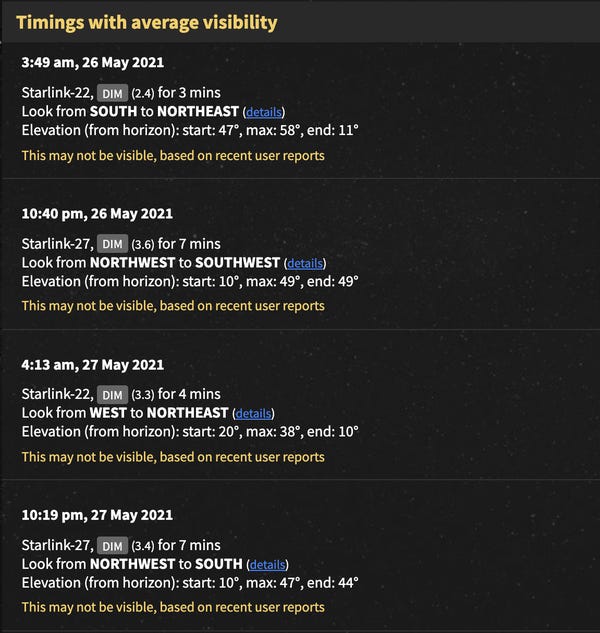
Find Starlink
Once you have typed in your location, the site will show timings with good, average, and poor visibility around that area. It tells you which direction to look in, how long the satellites will be noticeable for, and the elevation.
Find Starlink warns users that the timings are not 100% accurate as the orbit of the satellites can change.
“I prefer to keep user expectations and hype low, so I’d say ‘try it at your own risk,’ and ‘don’t blame me if you waited outside in the cold and saw nothing,'” the creator said.
The website is accurate four to five days after SpaceX launch a new batch of Starlink satellites, he said, adding that he receives a lot of emails about successful sightings on a daily basis.
One week after the launch, it’s tricky to predict where the satellites will be because they are assigned to their level orbit where they are less reflective and more difficult to see from the ground, the creator said.
This is called “rolling behaviour,” when SpaceX reduce the brightness of the satellites between 300 km to 550 km altitude to not disturb astronomers, he said.
WhatsApp initially threatened to revoke core functions for users that refused to accept its controversial new privacy policy, only to walk back the severity of those consequences earlier this month amid international backlash, and now, it’s doing away with them altogether (for the time being, at least).
In a reversal, the company clarified on Friday that it won’t restrict any functionality even if you haven’t accepted the app’s updated privacy policy yet, TNW reports.
“Given recent discussions with various authorities and privacy experts, we want to make clear that we will not limit the functionality of how WhatsApp works for those who have not yet accepted the update,” a WhatsApp spokesperson said in a statement to the Verge. They added that this is the plan moving forward indefinitely.
In an update to the company’s FAQ page, WhatsApp clarifies that no users will have their accounts deleted or lose functionality if they don’t accept the new policies. That being said, WhatsApp will still send these users reminders to update “from time to time,” WhatsApp told the Verge. On its support page, WhatsApp claims that the majority of users who have seen the update have accepted.
Initially, the deadline to accept was planned for February, but WhatsApp pushed that date back to May 15 after coming under fire from lawmakers, consumer rights advocates, and its own users, among other critics. At issue is how this updated policy lets WhatsApp handle users’ personal data, raising concerns that it would begin forking that information over to its parent company, Facebook. (Admittedly, WhatsApp has already been doing that with users’ phone numbers since an update to its privacy policy in 2016, as the Verge notes.) WhatsApp’s bungled rollout and scary-sounding ultimatums fueled the outrage further.
G/O Media may get a commission
The company aims to debunk these privacy concerns on its FAQ page, in which it stresses that this new policy primarily affects business messaging and Facebook will not have access to users’ location data or message logs. WhatsApp head Will Cathcart also posted a Twitter thread going into more detail.
Nonetheless, rival messaging platforms Telegram and Signal have seen a surge in downloads since WhatsApp announced its deadline for adopting its new privacy policy. Several federal authorities have pushed for WhatsApp to retract its new privacy policy or limited its rollout to users, arguing that the update violates local data protection regulations.
Newly unredacted documents in a lawsuit against Google reveal that the company’s own executives and engineers knew just how difficult the company had made it for smartphone users to keep their location data private.
Google continued collecting location data even when users turned off various location-sharing settings, made popular privacy settings harder to find, and even pressured LG and other phone makers into hiding settings precisely because users liked them, according to the documents.
Jack Menzel, a former vice president overseeing Google Maps, admitted during a deposition that the only way Google wouldn’t be able to figure out a user’s home and work locations is if that person intentionally threw Google off the trail by setting their home and work addresses as some other random locations.
Jen Chai, a Google senior product manager in charge of location services, didn’t know how the company’s complex web of privacy settings interacted with each other, according to the documents.
Google and LG did not respond to requests for comment on this story.
The documents are part of a lawsuit brought against Google by the Arizona attorney general’s office last year, which accused the company of illegally collecting location data from smartphone users even after they opted out.
A judge ordered new sections of the documents to be unredacted last week in response to a request by trade groups Digital Content Next and News Media Alliance, which argued that it was in the public’s interest to know and that Google was using its legal resources to suppress scrutiny of its data collection practices.
The unsealed versions of the documents paint an even more detailed picture of how Google obscured its data collection techniques, confusing not just its users but also its own employees.
Google uses a variety of avenues to collect user location data, according to the documents, including WiFi and even third-party apps not affiliated with Google, forcing users to share their data in order to use those apps or, in some cases, even connect their phones to WiFi.
“So there is no way to give a third party app your location and not Google?” one employee said, according to the documents, adding: “This doesn’t sound like something we would want on the front page of the [New York Times].”
When Google tested versions of its Android operating system that made privacy settings easier to find, users took advantage of them, which Google viewed as a “problem,” according to the documents. To solve that problem, Google then sought to bury those settings deeper within the settings menu.
Google also tried to convince smartphone makers to hide location settings “through active misrepresentations and/or concealment, suppression, or omission of facts” — that is, data Google had showing that users were using those settings — “in order to assuage [manufacturers’] privacy concerns.”
Google employees appeared to recognize that users were frustrated by the company’s aggressive data collection practices, potentially hurting its business.
“Fail #2: *I* should be able to get *my* location on *my* phone without sharing that information with Google,” one employee said.
“This may be how Apple is eating our lunch,” they added, saying Apple was “much more likely” to let users take advantage of location-based apps and services on their phones without sharing the data with Apple.
Apple Inc (AAPL.O) is delaying the launch of a podcast subscription service until June after some podcast creators had issues with delays in their shows appearing after uploading them, according to an email seen by Reuters.
Apple in April said it was introducing a service that would let podcast creators charge for their shows, with Apple keeping a 30% commission in the first year of a subscription and thereafter dropping commissions to 15%, similar to its App Store.
The service was originally slated to start this month.
Our Standards: The Thomson Reuters Trust Principles.